


Content ITV PRO
This is Itvedant Content department
Learning Outcome(Slide2)
6
Basics of branding and messaging
5
Target audience and segmentation
4
Different marketing channels
3
Creating value for customers
2
Understanding customer needs
1
What marketing means ?
Choose cool, soft colors instead of vibrant colors
Max 6 Points for Summary & Min 4
Topic Name-Recall(Slide3)
Hook/Story/Analogy(Slide 4)
Transition from Analogy to Technical Concept(Slide 5)
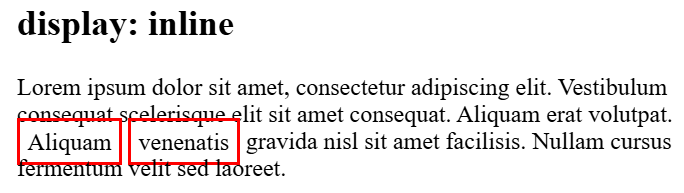
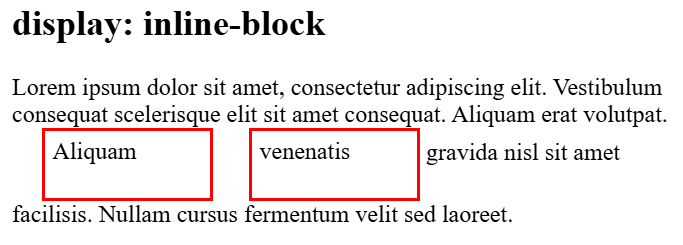
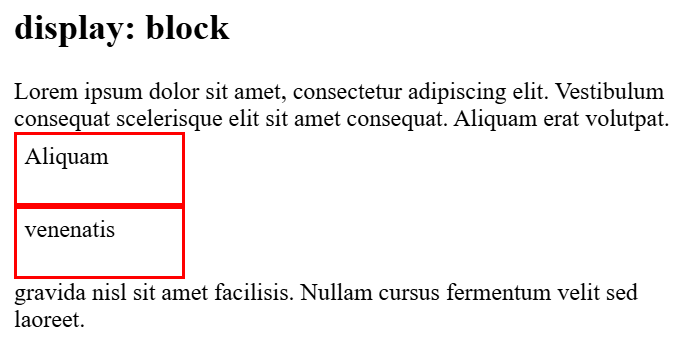
The CSS `display` property controls how an HTML element is presented in the layout
Whether element starts on new line
Whether element starts on new line
Whether it takes full width
Whether it remains inline
block
inline
inline-block
The element generates a block-level box, which means it starts on a new line and takes up the full width available
It can sit next to other elements on the same line while still respecting height and width properties
It can sit next to other elements on the same line while still respecting height and width properties
The visibility property determines if an element is visible, but unlike display: none, a hidden element still takes up space, allowing you to toggle visibility without affecting surrounding content.
div{
visibility:hidden;
}
hidden
Space preserved — the dashed box shows where the element still occupies layout space even when invisible.
Property
Space reserved
display:none;
visibility:hidden
NO
YES
Space reserved
The CSS `position` property controls how an HTML element is positioned within its container or the viewport
Static
This position places the elements one below the other i.e document flow
Note: Static position elements don’t follow top/right/bottom/left properties
Container
Relative
This position places the elements relative with its original position
Note: Relative position elements follow top/right/bottom/left properties
Container
Absolute
The element is removed from normal document flow and positioned relative to its nearest positioned ancestor(container)
Container
Container
An element with position: fixed is removed from the normal document flow and stays fixed relative to the browser window, even when the page is scrolled.
An element with position: sticky behaves like a relative element until a specified scroll position is reached, then it sticks to that position while scrolling.
Core Concepts (Slide 7)
Core Concepts (.....Slide N-3)
Summary
5
Build strong branding
4
Use different marketing channels
3
Target the right audience
2
Create and communicate value
1
Understand customer needs
Choose cool, soft colors instead of vibrant colors
Max 5 Points for Summary & Min 2
Quiz
Which platform is mainly used for professional networking and B2B marketing ?
A. Facebook
B. Instagram
C. LinkedIn
D. Snapchat
Quiz-Answer
Which platform is mainly used for professional networking and B2B marketing ?
A. Facebook
B. Instagram
C. LinkedIn
D. Snapchat
By Content ITV