Investigate Customer Transactions Using SQL Queries

Business Scenario
Welcome!
Today is your fourth day as a Database Developer at our digital banking company.
Now, the client wants the banking operations team to investigate customer transactions, monitor account activity, and generate banking insights using SQL queries.

The bank staff should be able to:

- Retrieve customer and account information
- Search and filter transaction records
- Identify high-value and suspicious transactions
- Generate sorted and organized banking reports
- Handle missing or incomplete banking data
- Categorize customer accounts based on balance
- Analyze customer activity using advanced SQL query techniques
Your task is to investigate and analyze banking data using SQL DQL commands.
Pre-Lab Preparation
Topic : Querying into Data (DQL)
1) Mastering SELECT Statements
2) Sorting Query Results
3) Result Control with LIMIT and OFFSET
4) Window Functions Decoded
5) Nulls Decoded
git pull origin branchName
Git Pull
Task 1: Review Customer Banking Information
The customer support team wants to view all customer records available in the banking system before processing banking requests.
In this task, you will retrieve customer information stored inside the Customers table.
1
View Complete Customer Information
This retrieves all columns and records from the Customers table.
SELECT * FROM Customers;Result:
The complete customer details will be displayed.

2
View Only Required Customer Details
The operations manager only wants customer names, email addresses, and phone numbers for communication purposes.
SELECT FirstName, LastName, Email, Phone
FROM Customers;
This retrieves only the required columns from the table.
Result:
Pre-Lab Preparation
- Explore different restaurants
-
View food items and menus
-
Add items to cart
-
Place orders online
Topic : Weaving the world of Web
1) Navigating the world of Web
2) Building Blocks of Website,
3) Tag Titans: Fundamental Web Construct.
git pull origin branchNameGit Pull
Task 1: Understanding BRD
Before you start building anything, you need to clearly understand what the client actually wants.So, let’s begin by understanding the BRD (Business Requirement Document) shared by the client.
BRD Full Form is Business Requirement Details.BRD like a plan for building a house. This plan helps the builder understand what to build.In the same way,BRD tells developers what the client wants to build
Click to download BRD : BiteBox_BRD.pdf
Activity
After going through BRD list down the Core Features and Web Pages in the tabulated Format as shown Below.
| Col 1 | Col 2 | Col 3 |
|---|---|---|
| Row 1 | ||
| Row 2 | ||
| Row 3 |
Formula
Profit = Revenue - Cost
Task 2: Create WireFrame
Now that you understand the requirements, don’t jump into coding yet. Before development, we always visualize the layout.
Now lets create a simple wireframe for the homepage.
A wireframe is like a layout plan of a house. Before building, you decide where rooms, doors, and windows will be placed.Similarly, a wireframe helps you plan where elements like headers, images, and buttons will appear on a webpage—before adding design or colours.
Task 3: Code Editor Installation
Good work on completing the planning phase.
Now we will start development. Before that, make sure your system is ready with the required tools.
In this step we will install the VS code editor that will help to Write code efficiently,Organize files , Run and test your application
Go to the visual studio code official website
1
Click to download Homepage Wireframe : Homepage Wireframe
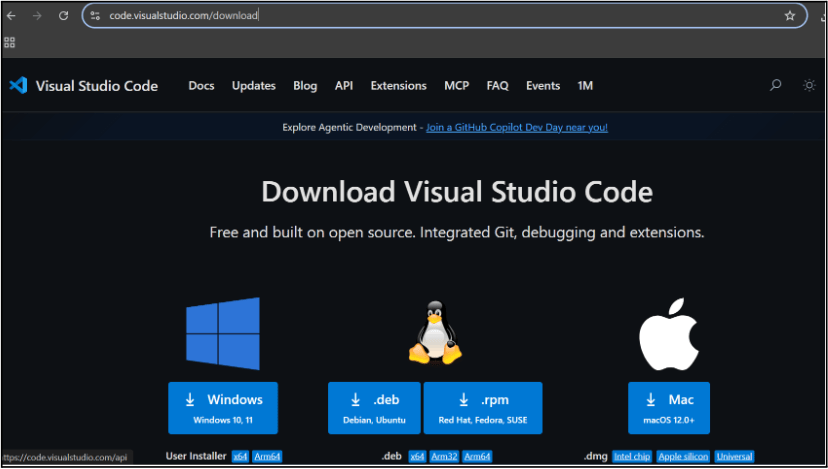
Choose your operating system(windows / Mac) and download the installation file.
Double click on the download app and Accept the agreement and click next
2
It is a long established fact that a reader will be distracted
b
Sub Steps
a
Double click on the download app and Accept the agreement and click next
public class MathSample {
    public static void main(String[] args) {
        int x = 10;
        int y = 20;
        int sum = x + y;

        System.out.println("The sum is: " + sum);
    }
}
public class MathSample {
public static void main(String[] args) {
int x = 10;
int y = 20;
int sum = x + y;
System.out.println("The sum is: " + sum);
}
}
public class MathSample {
public static void main(String[] args) {
int x = 10;
int y = 20;
int sum = x + y;
System.out.println("The sum is: " + sum);
}
}
Great job!
You have successfully completed your first lab on BiteBox Project Onboarding.
In this lab, you have: Understood the BRD, Created a wireframe, Set up your development environment, Organised your project structure, Run your first program
You are now ready to move to the next stage of development
Checkpoint
Next-Lab Preparation
Git Push
git push origin branchNameTopic : Working with a Text and Listin HTML
1) Power of HTML text tags
2) Customizing your style with CSS
3) Listing it right using HTML
4) HTML Link up , attributes of tag, block vs inline elements
Text box Width : 887
Business Scenario, Pre-lab Preparation, Next-lab Preparation, Task, Activity, Checkpoint : 90%.
Steps : 1,2,3 [Sub Steps - a,b,c]
Normal Text, Topic Name : 80%
Subtopic : 70%
Code Box font Size : 16px