
Content ITV PRO
This is Itvedant Content department
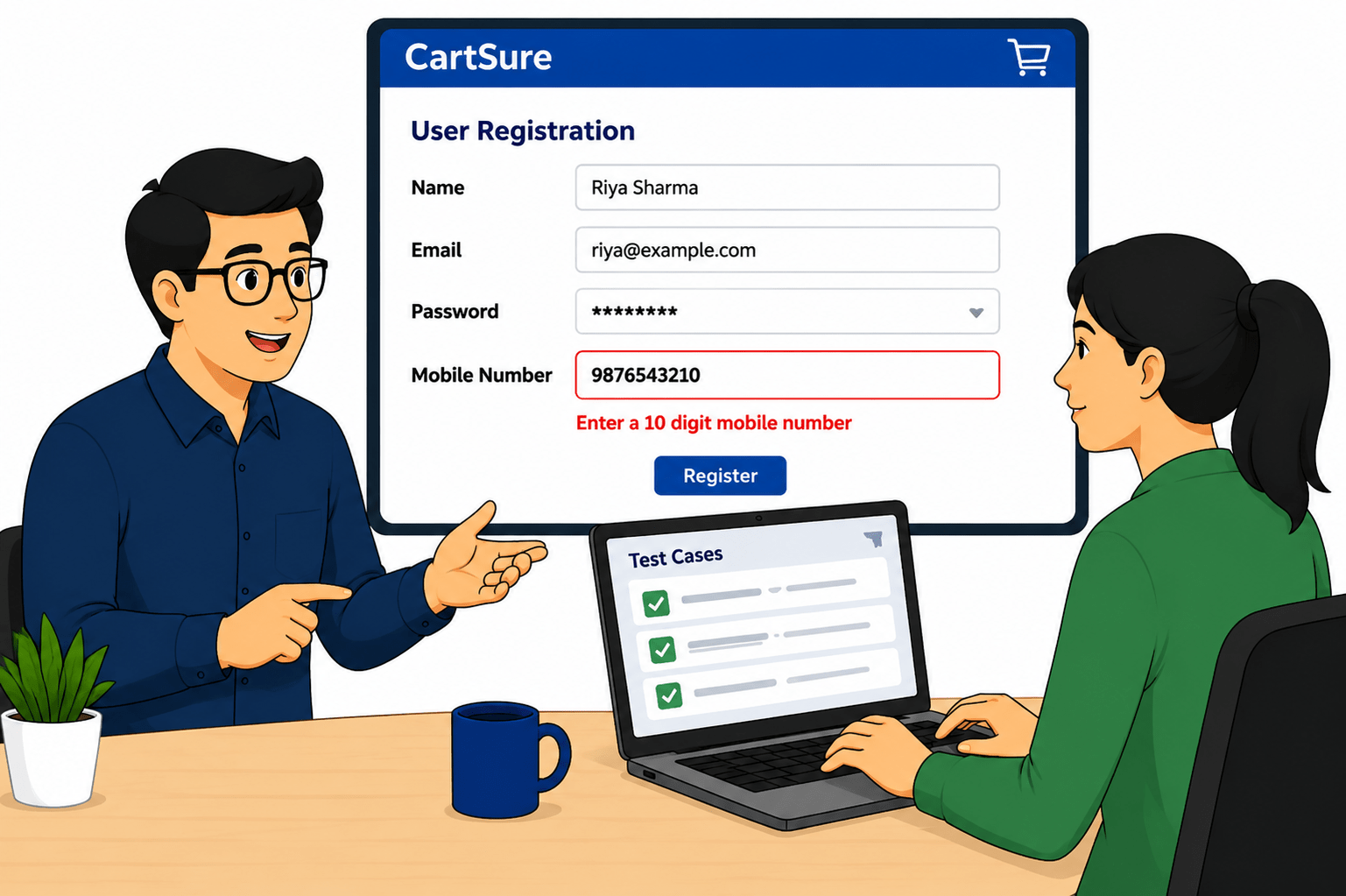
CartSure Input validation using BVA and EP
Business Scenario
Welcome!
You are now continuing your learning journey in the CartSure project as a Software Tester.
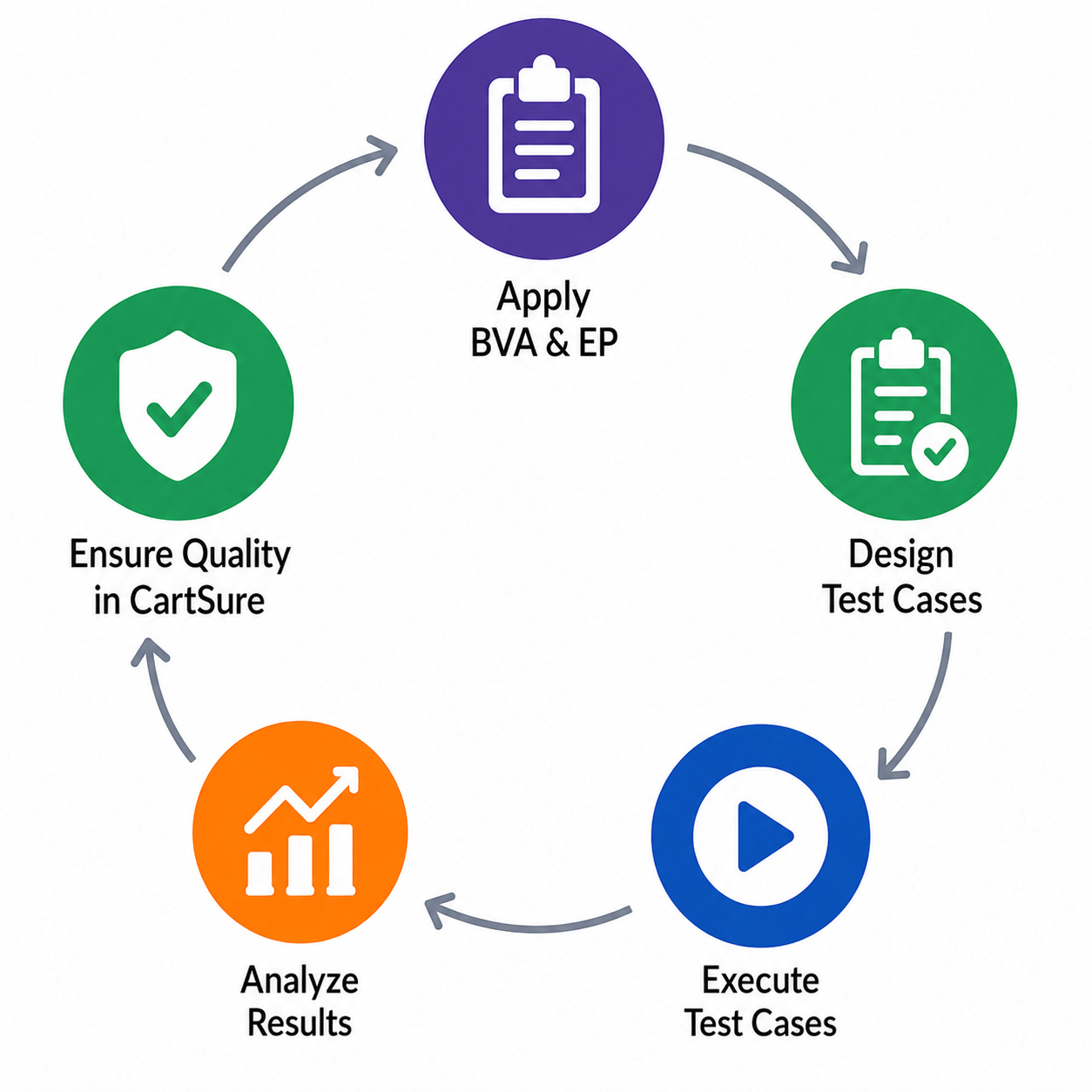
After performing functional testing, retesting, and regression testing activities, your manager introduces you to another important testing concept today — Input Validation using Boundary Value Analysis (BVA) and Equivalence Partitioning (EP).
After understanding these techniques, you begin designing input validation test cases for CartSure features by considering different valid, invalid, boundary, and special character inputs.
Once the test cases are prepared, you execute them carefully and analyze the results to verify whether the application correctly accepts valid inputs and rejects invalid data with proper validation messages.
These activities help ensure that CartSure handles user inputs accurately, improves application reliability, and delivers a better user experience.
So, today you will learn how to apply Boundary Value Analysis and Equivalence Partitioning techniques to design effective input validation test cases for the CartSure project.
Pre-Lab Preparation
Topic: Testing Techniques
1)Black Box vs White Box And Equivalence Partitioning
2)Boundary Value Analysis And Decision Table & State Transition
Task 1: Perform Retesting
Understand the E-commerce Scenario
1
1
git pull origin branchNameGit Pull
Imagine an online shopping checkout page with these fields:
Define Validation Rules
1
2
Apply Equivalence Partitioning (EP)
1
3
Divide inputs into Valid and Invalid groups
| FIELD | RULE |
|---|---|
| QAUNTITY | 1 to 100 |
| PRICE | Rs.0.01 to Rs.100000 |
| COUPON CODE | 5-10 Characters |
| PHONE NUMBER | Exactly 10 Digits |
| ZIP CODE | Exactly 6 Digits |
Quantity: Valid Class - 1 to 100
Invalid Classes - Less than 1 - (0,-5)
Greater than 100 - (101,200)
Price: Valid - Rs. 0.01 to Rs. 100000
Invalid - less than or equal to 0 (0,-10)
Greater than 100000 (1000001)
Coupon Code: Valid - 5 to 10 Characters
Invalid - less than 5, e.g., "ABCD"
Greater than 5, e.g., "ABCDEFGHIJI"
Empty
Phone Number: Valid 10 Digits, e.g., "1234567890"
Invalid - less than 10 Digits, e.g., "123456789"
Greater than 10 Digits, e.g., "12345678910"
Contain Letters, e.g., "987ADS5546S"
ZipCode: Valid 6 Digits, e.g., "400001"
Invalid - less than 6 Digits, e.g., "12345"
Greater than 6 Digits, e.g., "12345678"
Contain Letters, e.g., "40000A"
Apply Boundary Value Analysis(BVA)
1
4
Test Edge Values
Quantity(1-100)
| TEST VALUE | RESULT |
|---|---|
| 0 | INVALID |
| 1 | VALID |
| 2 | VALID |
| 99 | VALID |
| 100 | VALID |
| 101 | INVALID |
| TEST VALUE | RESULT |
|---|---|
| 0 | INVALID |
| 0.01 | VALID |
| 0.02 | VALID |
| 9999.99 | VALID |
| 100000 | VALID |
| 100000.01 | INVALID |
Price (0.01-100000)
| TEST VALUE | RESULT |
|---|---|
| 4 | INVALID |
| 5 | VALID |
| 6 | VALID |
| 10 | VALID |
| 11 | INVALID |
Coupon Code (Length)
| INPUT | RESULT |
|---|---|
| 9 Digits | INVALID |
| 10 Digits | VALID |
| 11 Digits | INVALID |
Phone Number
| INPUT | RESULT |
|---|---|
| 5 Digits | INVALID |
| 6 Digits | VALID |
| 7 Digits | INVALID |
ZipCode (Length)
Task 2: Apply Equivalence Partitioning
Identify Input Fields (E-commerce Example)
1
1
Typical Checkout/Registration field
Define Equivalence Classes
1
2
1.Product Quantity(1-100)
Greater than 100 - (101,200)
2.Product Price(Rs. 0.01- Rs. 100000)
Greater than 10000 - (10001,20000)
3.Coupon Code(5-10 Characters):
Greater than 5, e.g., "ABCDEFGHIJI"
Empty
4.Phone Number(10 Digits):
Greater than 10 Digits, e.g., "12345678910"
Contain Letters, e.g., "987ADS5546S"
5.Email ID
Missing Domain - user@
Missing Special Character - user.com
6.Password(Min 8 Characters):
Empty
7.ZipCode(6 Digits):
More than 6 Digits, e.g., "12345678"
Contain Letters, e.g., "40000A"
Task 3: Design Test Cases
Understand the E-commerce Scenario
1
1
Test Case Format
Identify Modules
1
1
We will design Test Cases For
Understand the E-commerce Scenario
1
1
Test Case Format
Pre-Lab Preparation
View food items and menus
Add items to cart
Place orders online
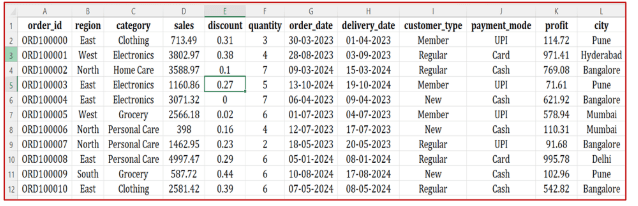
In this task, you will begin by understanding the business problem and the structure of the dataset provided to you. This is a crucial first step in any data analysis workflow.
git pull origin branchNameGit Pull
Task 1: Apply Boundary Value Analysis
Identify Fixed Defects
1
1
Collect list of defects marked as “Fixed” by developers
Prepare Test Data
1
2
Use same data and steps used earlier
Re-execute Failed Test Cases
1
3
Run only previously failed test cases
Example: Add to cart and Checkout
Task 1: Understanding BRD
Before you start building anything, you need to clearly understand what the client actually wants.So, let’s begin by understanding the BRD (Business Requirement Document) shared by the client.
BRD Full Form is Business Requirement Details.BRD like a plan for building a house. This plan helps the builder understand what to build.In the same way,BRD tells developers what the client wants to build
Click to download BRD : BiteBox_BRD.pdf
Activity
After going through BRD list down the Core Features and Web Pages in the tabulated Format as shown Below.
Task 1: Understanding BRD
Before you start building anything, you need to clearly understand what the client actually wants.So, let’s begin by understanding the BRD (Business Requirement Document) shared by the client.
BRD Full Form is Business Requirement Details.BRD like a plan for building a house. This plan helps the builder understand what to build.In the same way,BRD tells developers what the client wants to build
Click to download BRD : BiteBox_BRD.pdf
Activity
After going through BRD list down the Core Features and Web Pages in the tabulated Format as shown Below.
Task 1: Understanding BRD
Before you start building anything, you need to clearly understand what the client actually wants.So, let’s begin by understanding the BRD (Business Requirement Document) shared by the client.
BRD Full Form is Business Requirement Details.BRD like a plan for building a house. This plan helps the builder understand what to build.In the same way,BRD tells developers what the client wants to build
Click to download BRD : BiteBox_BRD.pdf
Activity
After going through BRD list down the Core Features and Web Pages in the tabulated Format as shown Below.
| Col 1 | Col 2 | Col 3 |
|---|---|---|
| Row 1 | ||
| Row 2 | ||
| Row 3 |
Formula
Profit = Revenue - Cost
Task 2: Create WireFrame
Now that you understand the requirements, don’t jump into coding yet. Before development, we always visualize the layout.
Now lets create a simple wireframe for the homepage.
A wireframe is like a layout plan of a house. Before building, you decide where rooms, doors, and windows will be placed.Similarly, a wireframe helps you plan where elements like headers, images, and buttons will appear on a webpage—before adding design or colours.
Task 3: Code Editor Installation
Good work on completing the planning phase.
Now we will start development. Before that, make sure your system is ready with the required tools.
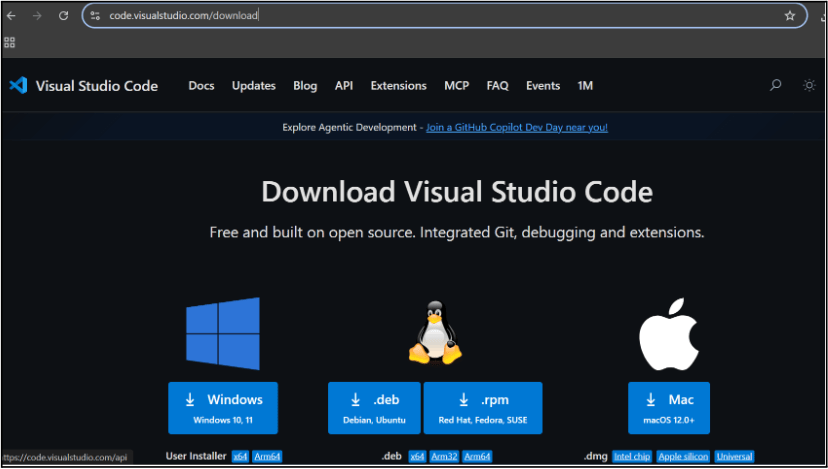
In this step we will install the VS code editor that will help to Write code efficiently,Organize files , Run and test your application
Go to the visual studio code official website
1
Click to download Homepage Wireframe : Homepage Wireframe
Choose your operating system(windows / Mac) and download the installation file.
Double click on the download app and Accept the agreement and click next
2
It is a long established fact that a reader will be distracted
b
Sub Steps
a
Double click on the download app and Accept the agreement and click next
public class MathSample {
    public static void main(String[] args) {
        int x = 10;
        int y = 20;
        int sum = x + y;

        System.out.println("The sum is: " + sum);
    }
}
public class MathSample {
public static void main(String[] args) {
int x = 10;
int y = 20;
int sum = x + y;
System.out.println("The sum is: " + sum);
}
}
public class MathSample {
public static void main(String[] args) {
int x = 10;
int y = 20;
int sum = x + y;
System.out.println("The sum is: " + sum);
}
}
Great job!
You have successfully completed your first lab on BiteBox Project Onboarding.
In this lab, you have: Understood the BRD, Created a wireframe, Set up your development environment, Organised your project structure, Run your first program
You are now ready to move to the next stage of development
Checkpoint
Next-Lab Preparation
Git Push
git push origin branchNameTopic : Working with a Text and Listin HTML
1) Power of HTML text tags
2) Customizing your style with CSS
3) Listing it right using HTML
4) HTML Link up , attributes of tag, block vs inline elements
Text box Width : 887
Business Scenario, Pre-lab Preparation, Next-lab Preparation, Task, Activity, Checkpoint : 90%.
Steps : 1,2,3 [Sub Steps - a,b,c]
Normal Text, Topic Name : 80%
Subtopic : 70%
Code Box font Size : 16px
By Content ITV